
Python Reading Tutorial
Use the Python example package to read ANROT sensor data on Windows, Raspberry Pi, and general Linux workflows.
- python
- serial
- tutorial
Read ANROT Sensor Data With Python
Protocol Support
| Protocol / frame | Support | How this example handles it |
|---|---|---|
0x91 HI91 / IMUSOL | Supported | AnrotSerialParser._parse_hi91() decodes single-device float IMU frames. |
0x92 HI92 | Supported | Decodes compressed single-device IMU frames. |
0x81 HI81 | Supported | Decodes frames with GNSS/INS fields. |
0x63 Gateway Compact | Supported | Decodes the gateway compact header and 0x93 node blocks, returning one frame per node. |
0x62 GWSOL | Not supported | The Python parser has no 0x62 case; use Qt C++, Ubuntu, or ROS Kinetic for gateway float collection frames. |
NMEA (GGA, RMC, VTG, GSA, GSV, SXT) | Supported | AnrotNmeaParser parses text output; SXT accepts $GPSXT and $GNSXT. |
This example is the fastest path for a first serial test on Windows, Raspberry Pi, Ubuntu, Jetson, or another Linux computer. Start with list to find the serial port, use read to watch live attitude data, and use send only when you need to send a configuration command.
When To Use It
- The ANROT device is connected through USB or a USB-UART adapter.
- The device baud rate matches the command you run. The examples below use
115200. - You want a small command-line workflow before integrating the parser into your own application.
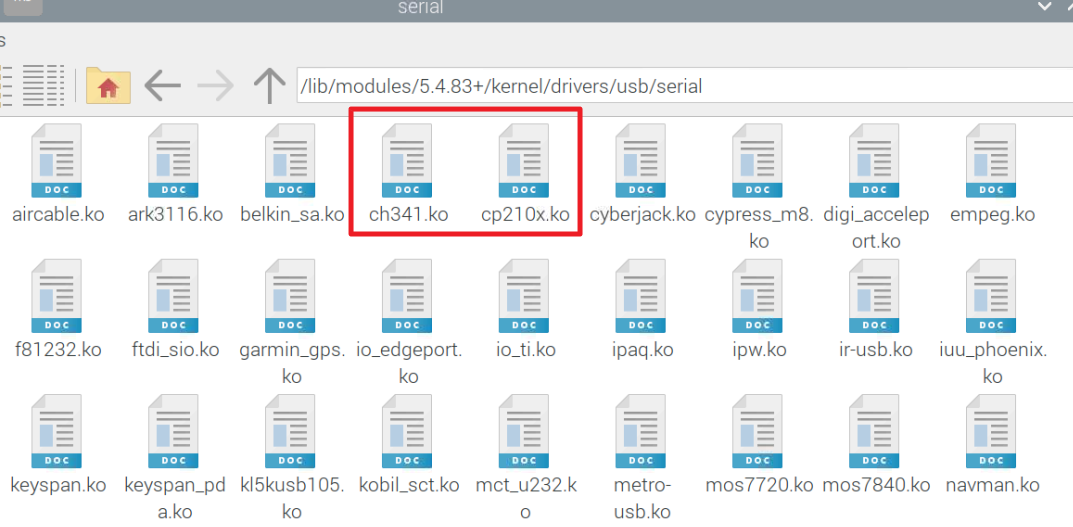
Most recent Linux kernels already include common USB-UART drivers such as CP210x and CH340. If no /dev/ttyUSB* device appears after plugging in the product, check whether the cp210x or ch341 driver is loaded.
Download And Unzip
Browser download: demo-python-en.zip
Linux users can also run:
cd ~
wget https://sealandtech.com.tw/files/anrot/examples/python/demo-python-en.zip
unzip demo-python-en.zip
cd demo-python-en
Package Structure
demo-python-en/
├── main.py
├── requirements.txt
├── commands/
│   ├── cmd_list.py
│   ├── cmd_send.py
│   └── read_data.py
├── parsers/
│   ├── anrot_serial_parser.py
│   └── anrot_nmea_parser.py
└── utils.py
anrot_serial_parser.py parses ANROT binary frames. anrot_nmea_parser.py parses NMEA text output.
Install Dependencies
Use Python 3.6 or newer. A virtual environment is recommended:
python -m venv .venv
# Windows: .venv\Scripts\activate
# Linux: source .venv/bin/activate
pip install -r requirements.txt
1. List Available Serial Ports
python main.py list
Example output:
Your Python version is 3.11.2.
Found 3 available serial port(s):
Device: COM13                Manufacturer: Microsoft            Permissions: Unknown
Device: COM27                Manufacturer: Silicon Labs         Permissions: Unknown
On Linux, you can also unplug and replug the USB cable, then check which device appears:
ls /dev/ttyUSB*
2. Read Live Data
Windows:
python main.py read -p COM3 -b 115200
Linux or Raspberry Pi:
python main.py read -p /dev/ttyUSB0 -b 115200
After the parser receives valid frames, acceleration, gyroscope, magnetometer, Euler angle, and quaternion fields are printed. The numbers should change when you move the sensor.
Frame Type              : HI91
Temperature (C)         : 37
Acceleration (G)        : (0.010, 0.010, 1.003)
Gyroscope (deg/s)       : (-0.076, 0.053, -0.034)
Euler (deg)             : Roll -0.514 Pitch 0.575 Yaw 3.860
Quaternion              : (0.999, 0.005, -0.004, 0.034)
Frame rate              : 100 Hz
3. Send A Configuration Command
This example reads version information:
python main.py send -p COM3 -b 115200 "LOG VERSION"
Linux:
python main.py send -p /dev/ttyUSB0 -b 115200 "LOG VERSION"
The send command stops data output, sends the user command, saves the setting, and restarts data output. Use the user programming manual for the command list supported by your product.
Troubleshooting
No Serial Port Appears
Check the USB cable, USB-UART adapter, and power. On Linux, use dmesg | tail or ls /dev/ttyUSB* to confirm that the device is detected.
Permission Denied On Linux
For a quick test:
sudo python main.py read -p /dev/ttyUSB0 -b 115200
For regular use, add your account to the dialout group and log in again:
sudo usermod -a -G dialout $USER
Data Does Not Update
Confirm that the output protocol and baud rate match the command-line parameters. If the device was configured to another baud rate, change -b to the actual value, such as 460800 or 921600.